This is a guide on accessing the Openstack Swift Object Storage system using an FTP client. Openstack Swift has a beautiful API which you can program to. However, sometimes it is handy to quickly be able to access your Swift/Objectstore data without programming around it. We will use ftp-cloudfs to do this. There is also Softlayers swftp, but that does not support Keystone Authentication (2.0). ftp-cloudfs does support this. The OS X Cyberduck FTP client also has Openstack Swift support, however that is a native implementation, not using FTP. With ftp-cloudfs we can use any ftp client, from Filezilla to midnight commander.
We will be using the Dutch provider
CloudVPS, which is the first European-only Openstack Public Cloud, therefore not bound to the Patriot Act, so your data is more safe than it is with a provider that is vulnerable to the Patriot Act.
CloudVPS provides 10GB free ObjectStore, if you have VPS with them, the data is stored on at least 3 machines in 3 locations and they have a boatload of certifications (ISO 27001 etc).
If you order a VPS or Objectstore at
CloudVPS, please mention my name or this article. I'll get a little referal bonus, which will be used to keep this awesome website running.
Note that this article is not sponsored nor endorsed by CloudVPS, nor am I speaking for or as CloudVPS. They just happen to be the best Dutch Openstack provider.
Openstack is one of those cloudy cloud projects. Warning, keep your buzzword bingo cards ready for the
Wikipedia definition:
OpenStack is a free and open-source software cloud computing platform. It is primarily deployed as an infrastructure as a service (IaaS) solution. The technology consists of a series of interrelated projects that control pools of processing, storage, and networking resources throughout a data center, able to be managed or provisioned through a web-based dashboard, command-line tools, or a RESTful API. It is released under the terms of the Apache License.
Basically it is a very nice project which provides an easy and scalable way to:
- Virtualize (Compute / Nova) (KVM, VMWare, Xen)
- Provide scalable object access (Swift / Objectstore) (like s3)
- Manage it all using a nice dashboard (Horizon)
- Have a great API which lets people develop applications for it.
- Be open source. There is no vendor lock in, you can switch between any provider providing OpenStack.
In this tutorial we will focus on the Swift part, which provides s3 like access to files, or, objects.
As said, Swift has a very nice API to program to. For example, you can create an app for a TV show which streams extra video related to the TV show. This will be a one time peak in traffic, depending on the TV show it can get pretty high in volume. You don't want to set up all the capacity yourself, including scaling, distributing files over multiple servers and load balancing it all. Swift handles this for you. You do need to program to it, there is not an easy way (yet) to access it in your file browser for example.
The project
ftp-cloudfs solves this partly by acting as a proxy between the Object Store API and an FTP client. Installation is easy, it can all be done via
pip.
Requirements
You will need the following:
- access to an Openstack Swift instance (CloudVPS for example)
- python 2.7
- python-keystoneclient (if you are going to use v2.0 authentication)
- python-swiftclient
- an ftp client
This tutorial was written and tested on Ubuntu 12.04 and CentOS 6, but works everywhere the above requirements can be met.
Installing packages
We need to make sure we have python 2, pip and the keystone client installed. For Ubuntu/Debian:
apt-get install python-pip
For CentOS/RHEL:
yum install python-pip
Now we are going to install ftp-cloudfs, swiftclient and keystoneclient using pip. You should do this in a python virtualenv, however that goes beyond the scope of this tutorial.
pip install ftp-cloudfs python-keystoneclient python-swiftclient
Running the FTP server
When that is all finished we can start the ftp proxy like so:
ftpcloudfs --foreground --keystone-auth --auth-url https://identity.stack.cloudvps.com/v2.0
This will start up the FTP server in the foreground on port 2021, talking to the
CloudVPSSwift Object Store.
ftp-cloudfs has the following usage options:
Usage: ftpcloudfs [options]

Options:
  --version             show program's version number and exit
  -h, --help            show this help message and exit
  -p PORT, --port=PORT  Port to bind the server (default: 2021)
  -b BIND_ADDRESS, --bind-address=BIND_ADDRESS
                        Address to bind (default: 127.0.0.1)
  -a AUTHURL, --auth-url=AUTHURL
                        Authentication URL (required)
  --memcache=MEMCACHE   Memcache server(s) to be used for cache (ip:port)
  -v, --verbose         Be verbose on logging
  -f, --foreground      Do not attempt to daemonize but run in foreground
  -l LOG_FILE, --log-file=LOG_FILE
                        Log File: Default stdout when in foreground
  --syslog              Enable logging to the system logger (daemon facility)
  --pid-file=PID_FILE   Pid file location when in daemon mode
  --uid=UID             UID to drop the privilige to when in daemon mode
  --gid=GID             GID to drop the privilige to when in daemon mode
  --keystone-auth       Use auth 2.0 (Keystone, requires keystoneclient)
  --keystone-region-name=REGION_NAME
                        Region name to be used in auth 2.0
  --keystone-tenant-separator=TENANT_SEPARATOR
                        Character used to separate tenant_name/username in
                        auth 2.0 (default: TENANT.USERNAME)
  --keystone-service-type=SERVICE_TYPE
                        Service type to be used in auth 2.0 (default: object-
                        store)
  --keystone-endpoint-type=ENDPOINT_TYPE
                        Endpoint type to be used in auth 2.0 (default:
                        publicURL)
For CloudVPS, the username will be in the form of: TENANTNAME.EMAIL@ADDRESS.EXT. For example, BLA000066 Cinderella.user@example.org. If you have a tenant (tenant means project in Openstack terminology) with a dot in the name, you can use the--keystone-tenant-separator option to change it in, for example, a \ backslash.
Now use your FTP client to connect to the server and there's your Object Store. There are some limitations:
- you can not place files in the top level folder, you need a subfolder. This is because top level are containers.
- you can not rename a non-empty directory. You will get a
550 Directory not empty. error.
- you can not recursively delete a folder. That is handled by most clients, filezilla understands that it has to go in every folder and remove all the things and then remove the folder.
- top level folders are created as private containers. You will need to change them to public if that is needed.
These limitations come from the fact that we are not talking to a file system block storage, but to object storage. Try to force a square through a circle, and then appreciate how well ftp-cloudfs handles this.
To set the ftp proxy open for other users, set the --bind-address to 0.0.0.0. Remember that there is no encryption on FTP, so make sure you handle that in a different way.
Authentication Data
If you are unsure about what data you should use to authenticate you can use the
Openstack API to get that data. Your provider may for example not have it in a logical place. The Openstack Horizon dashboard provides all the required data and URLs under the "Access and Security --> API Access".
First get an authentication token using cURL:
curl -i 'https://identity.stack.cloudvps.com/v2.0/tokens' -X POST -H "Content-Type: application/json" -H "Accept: application/json" -d '{"auth": {"tenantName": "", "passwordCredentials": {"username": "user@example.com", "password": "passw0rd"}}}'
Response:
HTTP/1.1 200 OK
Vary: X-Auth-Token
Content-Type: application/json
Content-Length: 543
Connection: close

{
    "access": {
        "token": {
            "issued_at": "2014-05-19T03:24:50.971373",
            "expires": "2014-05-20T03:24:50Z",
            "id": "8g2CeQ3kM0tkRAEiu6KmGaI6M8NLFDJ8WQ"
        },
        "serviceCatalog": [],
        "user": {
            "username": "user@example.com",
            "roles_links": [],
            "id": "J0XPUWipImRpkFXAVxJYELAXnXx26jPPj9w",
            "roles": [],
            "name": "user@example.com"
        },
        "metadata": {
            "is_admin": 0,
            "roles": []
        }
    }
}
The token is the first id. In this case: 8g2CeQ3kM0tkRAEiu6KmGaI6M8NLFDJ8WQ.
Use the token to get a list of tenants for that token:
curl -i -X GET 'https://identity.stack.cloudvps.com/v2.0/tenants' -H "User-Agent: python-keystoneclient" -H "X-Auth-Token: 8g2CeQ3kM0tkRAEiu6KmGaI6M8NLFDJ8WQ"
Response:
HTTP/1.1 200 OK
Vary: X-Auth-Token
Content-Type: application/json
Content-Length: 523
Connection: close

{
    "tenants_links": [],
    "tenants": [
        {
            "handle": "HANDLE",
            "description": "HANDLE Projectname",
            "enabled": true,
            "id": "zORIDFV4ybpbV9bRg1gwNi7NNnTiCw",
            "name": "HANDLE Projectname"
        },
        {
            "handle": "HANDLE",
            "description": "Main Customer Tenant",
            "enabled": true,
            "id": "vnsdmwzPSl8dHm2RQQe",
            "name": "HANDLE"
        }
    ]
}
The part you want to have is the "name": "HANDLE Projectname" part. That is your tenant.
Screenshot
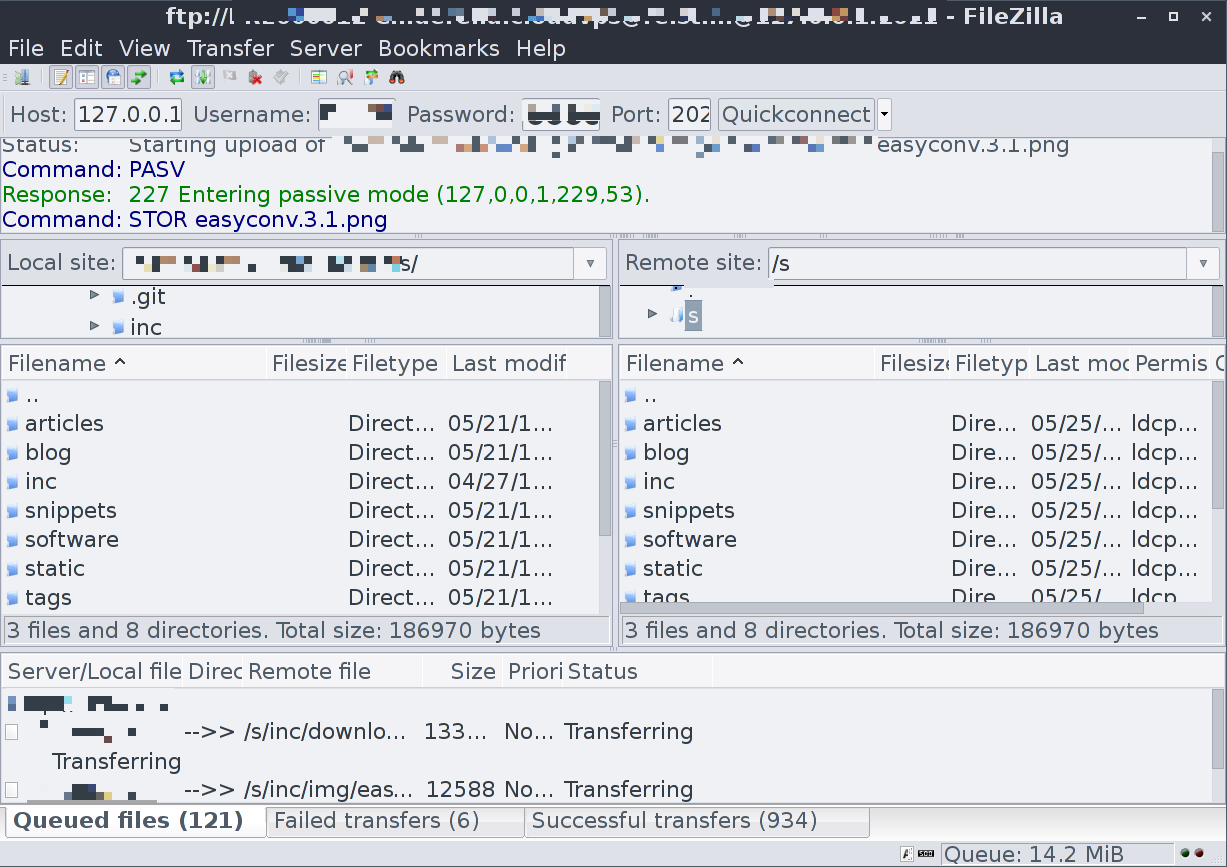
Here is a screenshot of Filezilla uploading a copy of this website to the Object Store: